Overtime logged automatically from the first tap to the payslip

No more unrecorded overtime or error-prone manual calculations, the system logs time, calculates compensation, and sends data to payroll automatically.

Feature Insight

Everything you need in Jenjang HRIS Overtime

Keep track of overtime right from the start to your payslip, and everything recorded.

Flexible pay formulas ensure smooth processing to Payroll.

Select a compensation model that aligns with company policy. all calculations are done automatically at payroll.

Per Hour

HR sets a fixed overtime rate per hour, making it simple and transparent for employees.

Example:

$ 5,000 / overtime hour

Hourly Salary

Calculated from monthly salary divided by normal hours, this follows the standard method used by most companies.

Example:

$5,000 ÷ 173 hours = $46.24 per hour.

Custom

HR can customize the formula to align with company policy, allowing for complex compensation structures.

Example:

Flexible: multipliers, hour caps, job-level tiers

Every compensation option flows automatically into the Payroll module, no recalculating during the payroll run
Time logged by the system, impossible to manipulate

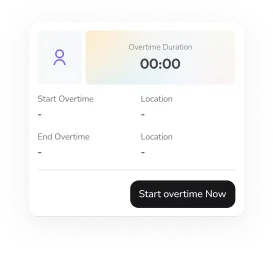
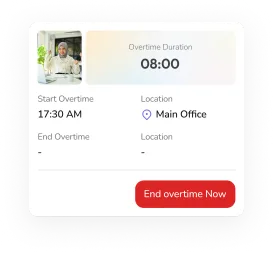
Employees just tap "Start" and "End", the system automatically logs timestamps, calculates duration, and stores the data as accurate audit evidence.

  • When an employee taps "Start Overtime," the server automatically logs the timestamp.
  • Tapping "End Overtime" logs the timestamp and calculates the duration automatically.
  • Duration cannot be manually edited or entered; it's tamper-proof.
  • Data is stored as accurate, verifiable audit evidence.
Start overtimeEnd overtime

Flexible approvals that match your organization's structure

HR sets up the approval flow to match your hierarchy. One level, two levels, or multi-level, all configurable.

Straight to HR

One-level approval is ideal for small businesses or flat teams.

Employee HR

Manager to HR

Two-level approval: the direct manager gives the first approval.

Employee Manager HR

Custom

A multi-level approval process designed for better governance in organizations.

Employee Add Approval Manager HR

HR Dashboard

More than just a request system

Real-time Overtime Recap

Check total overtime hours for each employee, department, and time period whenever you want, without waiting for reports.

Automatic Compensation

All approved overtime data goes straight into payroll calculations, so there are no extra steps needed.

Employee logging overtime

Connect With Jenjang HRIS Ecosystem

Jenjang HRIS ecosystem modules

Complete Reports

Export overtime summaries to Excel whenever you need, sorted by employee, department, or time period.

Overtime Flow

From request to approved, everything runs automatically

Every overtime entry moves from the first tap to payroll automatically, with no manual recaps.

01

Start Overtime

The employee taps "Start Overtime" in the Jenjang app, and the system automatically logs the start time.

02

End Overtime

The employee taps "End Overtime," and the system automatically calculates the duration.

03

Submit Request

The employee submits through the app, with the duration already calculated—no manual entry required.

04

Notify Approver

The approver receives the request and can approve or reject it directly from the notification.

FAQ

Overtime questions, answered

Employees tap "Start Overtime" and the system logs the time with a precise timestamp, so nothing goes unrecorded.

Turn Instinct Into Certainty

Join 300+ organizations making smarter talent decisions with Jenjang.

Request Demo

10 K+

Registered Users

50 K+

Assessments Completed

1 M+

People Data Points